Quick answer
If you work at a computer for hours, match the lens to your real monitor distance. A general progressive offers one-pair convenience, while an office lens can provide a wider intermediate field but limits distance vision. Screen height, frame fit, fitting measurements, and posture matter as much as the brand.
Choose progressive lenses for computer work by matching the viewing zone to your monitor distance, screen time, frame fit, posture, and key daily visual needs.
A general-purpose progressive can work well at a computer, but it gives part of the lens to distance and near vision. That leaves a narrower intermediate corridor for the screen. If you spend hours at a fixed desk, an office lens or a dedicated computer pair may provide a wider working area and a more natural head position.

Start with the distance, not the lens name
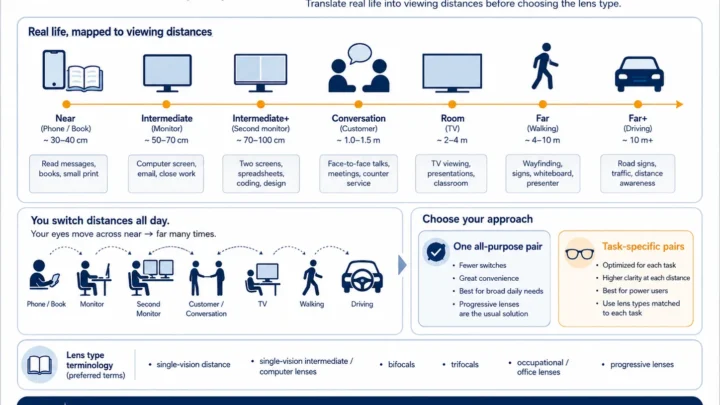
“Computer distance” is not one universal number. A laptop may sit closer than a large desktop monitor. A second screen may be farther away or off to one side. A person meeting clients across a desk needs a longer indoor range than someone working alone on one laptop.
Before choosing a lens, measure from the usual position of your eyes to:
- the center of your primary monitor;
- your secondary monitor, if you use one;
- your keyboard, documents, or detailed near work;
- the farthest person or object you need to see clearly without changing glasses.
Do this while sitting in your normal working posture. Do not move the screen into a temporary “perfect” position just for the measurement. The goal is to design for the workstation you actually use—or identify what should be changed.
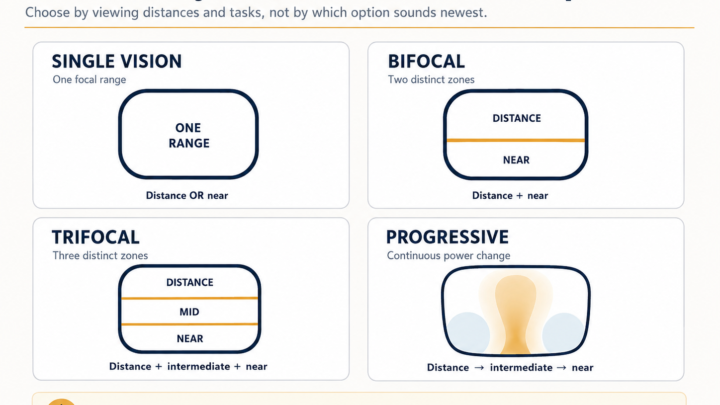
Which lens type fits your workday?
| Lens option | Best use | Main advantage | Main tradeoff |
|---|---|---|---|
| General-purpose progressive | Moving between driving, walking, meetings, screens, and reading | One pair covers far, intermediate, and near | The computer corridor may feel narrow during long screen sessions |
| Office or occupational lens | Long periods at a desk with near and intermediate tasks | More lens area can be devoted to the screen and workspace | Far vision is limited; these lenses are generally not for driving |
| Single-vision computer lens | One primary screen at a stable distance | A wide, simple field at the prescribed working distance | Reading and room vision may blur outside that distance |
| Reading glasses | Books, phones, and close detail | Wide near field | The monitor may be too far away, causing you to lean forward |
When an everyday progressive is enough
A general-purpose progressive is the most convenient choice when your day includes frequent movement between far, intermediate, and near tasks. It may be enough when screen sessions are shorter, the monitor is positioned well, the prescription is not especially demanding, and the lens has a comfortable intermediate balance.
It is also the logical first option when you want one pair and do not want to change glasses throughout the day. Before paying for a second pair, check whether the existing frame position, fitting height, screen height, text size, or prescription is causing the problem.
When an office lens makes more sense
An office lens is a task-specific multifocal. Instead of reserving the top of the lens for full distance vision, it can devote more space to near and intermediate distances. The farthest clear distance is selected for the work environment.
That change can make the screen zone wider and reduce the need to search for a narrow part of the lens. It can also help when a wearer lifts the chin to find the monitor through a general progressive.
An office lens may be worth discussing when:
- you work at a screen for several hours most days;
- the monitor is clear only through a small area of your progressives;
- you repeatedly raise your chin or tilt your head back;
- you use two or more screens;
- you need a wide field for spreadsheets, design, editing, or technical work;
- you also need to see people or objects across a desk or small room.
The compromise is important: office lenses do not normally provide useful driving vision. Treat them as a second pair for a defined workspace, not as an automatic replacement for an all-day progressive.
Monitor position changes how a progressive feels
The Occupational Safety and Health Administration recommends placing the monitor directly in front of the user, generally 20 to 40 inches (50 to 100 cm) from the eyes, with the top of the screen at or slightly below eye level. The exact comfortable distance depends on screen size, text size, posture, and visual needs.
Multifocal wearers may need the monitor slightly lower so they can use the intermediate part of the lens without tipping the head back. A very high screen can make a perfectly usable progressive feel wrong because the wearer must look through the distance area to see it.
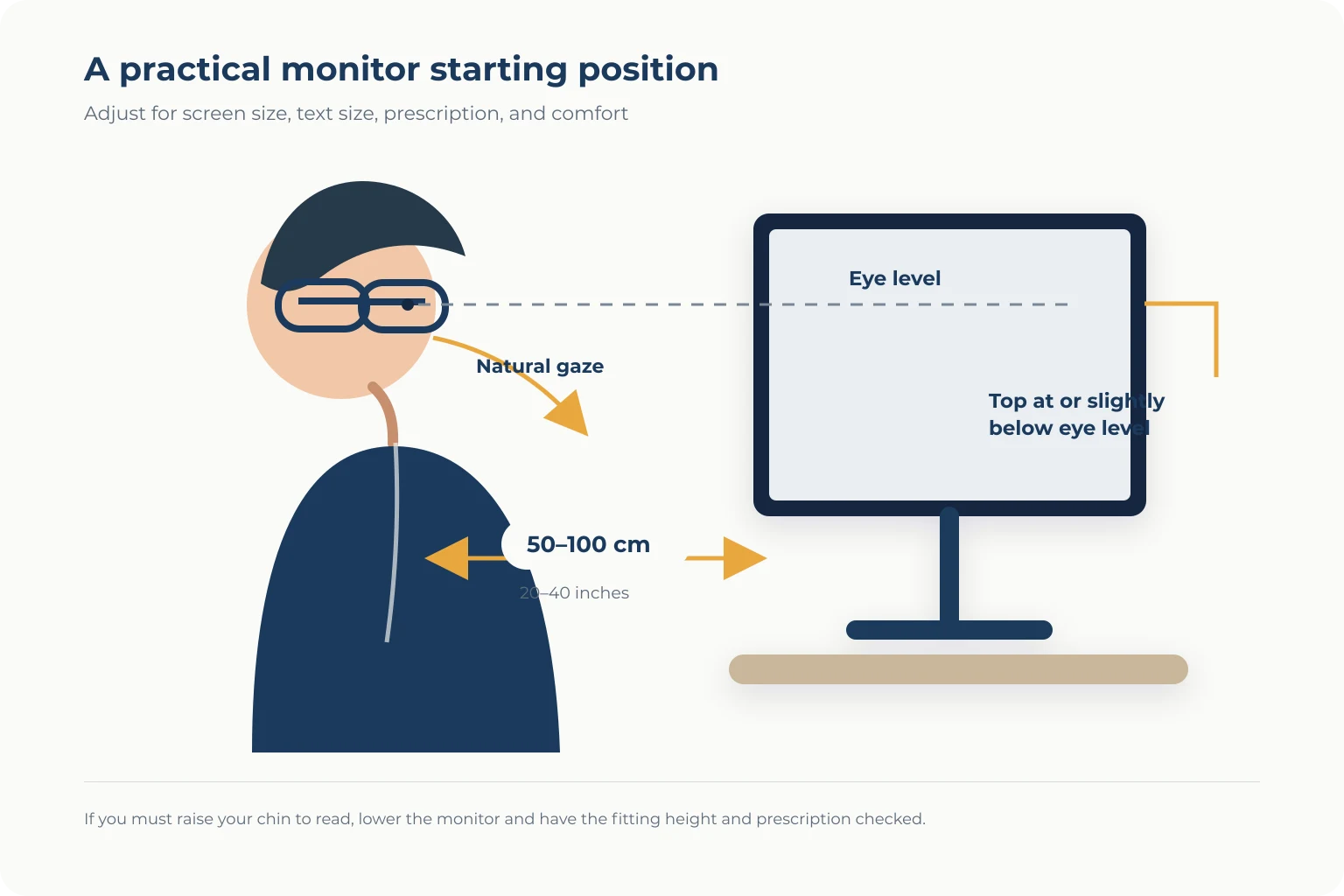
Use this practical setup:
- Sit with your back supported and head in a neutral position.
- Place the primary monitor directly in front of you.
- Move it to a distance where normal-size text is readable without leaning.
- Set the top edge at or a little below eye level.
- Open a normal work document, not an oversized test page.
- Notice whether you can see the screen without lifting your chin.
If you must lean forward, increase the text size before moving the screen closer. If you must raise your chin, lower the monitor and have the fitting height and prescription checked.
Measurements to request
Computer performance is affected by the same fitting variables that matter in any progressive order, plus an accurate understanding of working distance.
- Monocular pupillary distance: the horizontal position of each pupil in its own lens.
- Fitting height: the vertical alignment of the design after the frame has been adjusted.
- Near and monitor distances: measured from the eyes in the wearer’s real posture.
- Frame fit: the frame should stay level and avoid sliding during the day.
- Position-of-wear measurements: some personalized designs can use vertex distance, frame tilt, and wrap.
- Primary task priority: the design should reflect whether your day is dominated by one monitor, multiple screens, meetings, reading, or movement.
Do not take final fitting measurements before the frame is adjusted. If the frame later sits higher, lower, or at a different angle, your eyes may pass through a different part of the corridor.
Do you need a premium progressive for computer work?
Not automatically. A premium design may offer more customization or a different distribution of usable zones, but “premium” is not a standardized optical specification. Ask what changes in the actual design and which measurements are used.
A more customized general progressive may help if you need one all-day pair. But if nearly all discomfort occurs during eight hours at one workstation, a simpler dedicated office or computer lens may solve the task more directly than the most expensive general-purpose progressive.
Compare these points before comparing brand tiers:
- width of the intended intermediate area;
- maximum clear working distance;
- compatibility with the selected frame height;
- measurements used for customization;
- anti-reflective coating quality;
- remake and non-adapt policy;
- whether the quote is for one pair or a task-specific second pair.
Blue-light filters are a separate decision
A blue-light feature does not correct an inaccurate prescription, widen a narrow intermediate corridor, move the monitor into the right zone, or fix an unstable frame. Treat it as a separate coating or material decision rather than the main solution for computer discomfort.
Start with prescription accuracy, lens design, working distance, text size, glare control, and posture. If you are offered a blue-light product, ask what measurable benefit is being claimed and whether the coating changes color appearance or reflections.
Common symptoms and what to check
The screen is clear only when I lift my chin
The monitor may be too high, or the usable intermediate area may sit too low relative to your normal gaze. Lower the screen first, then check frame position and fitting height.
I have to lean toward the monitor
The working distance may not match the lens power, or the text may be too small. Measure the distance in your normal posture and increase text size before moving closer.
Only the center of the screen is clear
A progressive corridor is naturally narrower than a single-distance computer lens. The design, ADD power, frame size, and fitting can all affect the usable width. A task-specific lens may be more appropriate for wide spreadsheets or multiple monitors.
One monitor is clear and the second is not
Different distances and side angles can place the screens outside the same usable zone. Put the primary screen directly in front, bring the displays closer to the same distance, and discuss the total workspace width during the lens consultation.
My eyes feel dry or tired late in the day
Digital eye strain is not caused by the progressive design alone. Screen time, reduced blinking, glare, dry airflow, uncorrected prescription, and workstation posture can contribute. Look away regularly, blink deliberately, manage glare, and seek an eye examination if symptoms persist.
Questions to ask before ordering
- Is this a general progressive, office lens, or single-vision computer lens?
- What is the farthest distance this lens is designed to keep clear?
- Which exact monitor distance will be used in the order?
- How will the design handle my second monitor?
- Will right and left fitting measurements be taken separately?
- Can this frame hold the required corridor without cutting off useful zones?
- What should I bring to the collection appointment to test screen vision?
- What is covered if the monitor remains blurry after the frame and prescription are checked?
A simple decision rule
Choose a general-purpose progressive when one-pair convenience and full distance vision matter throughout the day. Consider an office lens when most of the day is spent between reading distance and a defined indoor range. Consider a single-vision computer lens when one screen distance dominates and maximum width matters more than changing focus.
The correct answer may be two pairs: one progressive for general life and one task-specific pair for the workstation. That is not an upgrade for its own sake; it is a way to stop forcing one lens design to optimize incompatible tasks.
Frequently asked questions
Can progressive lenses be used for computer work?
Yes. A general progressive includes an intermediate corridor that can support computer distance. Comfort depends on the monitor position, prescription, frame fit, fitting measurements, design balance, and amount of time spent at the screen.
Why do I lift my head when using a computer with progressives?
You may be trying to reach the intermediate part of the lens through a monitor that is too high. Lower the screen, keep it directly in front, and have the frame position and fitting height checked.
Are office lenses the same as progressive lenses?
Office lenses also change power across the lens, but they prioritize near and intermediate distances instead of full driving distance. They can provide a wider desk zone but are generally intended as a task-specific second pair.
Are blue-light glasses the best solution for computer eye strain?
No single coating fixes every cause of discomfort. Prescription accuracy, working distance, lens design, text size, glare, blinking, dry airflow, and posture should be checked first.
What monitor distance should I measure?
Measure from your eyes in your normal working posture to the center of each screen. OSHA describes a general preferred range of 20 to 40 inches, but your prescription and workstation should be evaluated individually.
For a retailer-specific example, see our GlassesUSA progressive lenses review, including the difference between its standard and office options and the measurements to confirm before checkout.
The bottom line
The best computer lens is not automatically the most expensive progressive. It is the option whose clear zone matches your real monitor distance, screen width, working hours, frame position, and posture. Measure the workstation first, then choose the lens.
New to multifocals? Read Progressive Lenses Explained. You can also use the questions to ask before ordering at your next fitting.
This article provides general educational information and does not diagnose eye conditions or replace a comprehensive eye examination. Persistent discomfort, double vision, sudden vision changes, pain, flashes, new floaters, or vision loss require professional eye care.
Sources and further reading

About Ho Truong
Ho Truong is a trained optician at a family optical practice established in 1991. Lens InsiderS explains lens design and fitting choices for buyers. It does not diagnose eye conditions or replace an eye examination.