An answer-first guide to entering OD, OS, SPH, CYL, Axis, ADD, prism, and PD when ordering prescription glasses online.
Evidence label: Independent analysis. By Ho Truong. Last checked August 13, 2026. This guide explains how to transfer information from a valid written eyeglass prescription. It does not interpret symptoms, choose lens powers, or replace an eye examination or professional fitting.
Quick answer
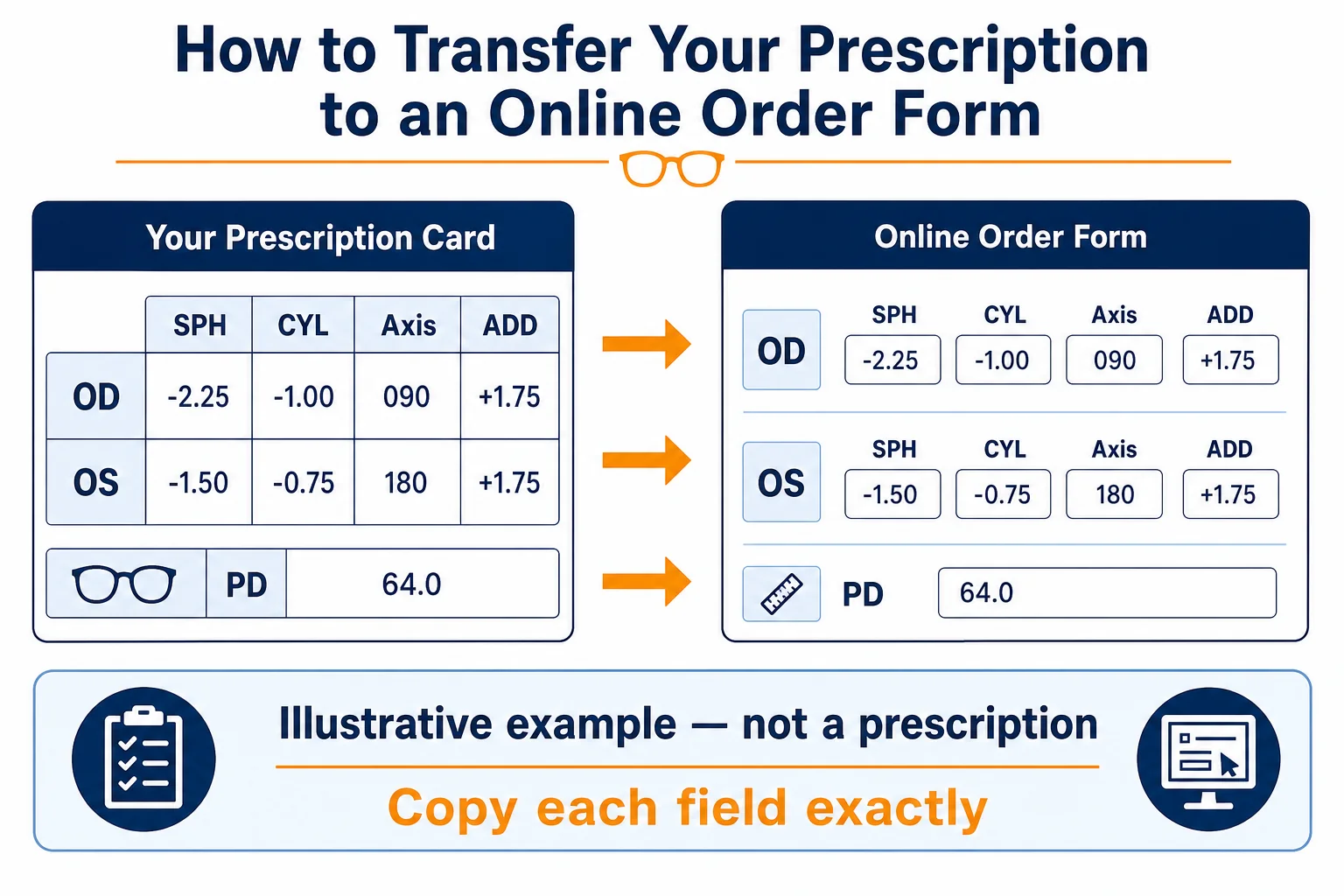
Copy each value exactly as written, one eye at a time: OD is the right eye and OS is the left. Preserve every plus or minus sign. Enter CYL and Axis together, ADD only when it appears on the prescription, and prism only in the fields specified by the prescriber. Pupillary distance, or PD, is a fitting measurement and may be listed separately. If a value is missing, unclear, outside the validity accepted by the applicable jurisdiction or retailer, or does not match the retailer’s form, stop and ask the prescriber or retailer to clarify it rather than guessing.
Online checkout can make a prescription look like a simple set of dropdowns. Do not estimate the answer that seems most likely. Your job is to transfer the written information; the prescriber determines it and the retailer or laboratory makes the lenses.
What you need before starting
- An eyeglass prescription that is valid for the order under the applicable jurisdiction, prescriber’s instructions, and retailer requirements, not a contact-lens prescription.
- A clear image or paper copy showing the right and left eye values.
- The prescription issue and expiration dates, where required by law.
- Your distance PD, preferably separate right- and left-eye values when ordering progressives.
- The prescriber’s contact details in case the seller needs clarification.
- The lens use or design established through the prescriber or dispensing workflow: distance, reading, computer, bifocal, or progressive. Do not choose a power or change the prescribed design from this article.
In the United States, the Federal Trade Commission’s Eyeglass Rule requires an optometrist or ophthalmologist to provide the eyeglass prescription after an examination that includes refraction. The FTC also notes that most states do not require PD on the prescription, even though it is needed to fit glasses. See the FTC’s consumer prescription guidance and Eyeglass Rule compliance guide.
A contact-lens prescription contains product and fitting information for a lens worn on the eye. Do not copy its power into an eyeglass order. If you only have a contact-lens prescription, request the separate eyeglass prescription.
OD and OS: keep the right and left eyes separate
OD identifies the right eye and OS identifies the left. Some prescriptions use R and L instead. A retailer may place the right eye first in one row and the left eye second, but always read the labels rather than relying on row position.
Copy a complete row before moving to the other eye. This reduces the risk of putting the right-eye SPH beside the left-eye CYL. If the two eyes have similar values, do not assume they are interchangeable.
SPH, CYL, and Axis: preserve the signs and pair the fields
SPH or Sphere
SPH is the main spherical lens power. It may have a plus sign, a minus sign, or a notation such as Plano, PL, or 0.00. Enter the sign exactly. A value of +1.50 is not the same as -1.50.
CYL or Cylinder
CYL records the astigmatism component when one is prescribed. It may also be written with a plus or minus sign. Do not convert plus-cylinder notation to minus-cylinder notation yourself, even if an online form appears to use a different convention. Transposition changes SPH, CYL, and Axis together and should be handled by the prescriber, retailer, or laboratory.
Axis
Axis gives the orientation of the cylinder and is written from 1 to 180 degrees. It is not an additional lens power. Axis normally accompanies a CYL value; an Axis without a clear CYL, or a CYL without an Axis, is a reason to stop and ask for clarification.
Do not add a leading plus sign, remove a minus sign, round a number, or choose the nearest dropdown value. If the exact written value is unavailable, ask the retailer whether the prescription is eligible for online ordering.
ADD: use it only when it is prescribed
ADD is additional plus power used for near or intermediate vision in multifocal prescriptions. It is relevant to bifocals, trifocals, progressives, and some task-specific lens designs. Our guide to what ADD means on an eye prescription explains the field in more detail.
Do not calculate ADD from age, reading distance, or an old pair of glasses. Do not copy ADD into the SPH field. If the prescription lists one ADD value and the online form requests one for each eye, ask the seller how its form should be completed. If no ADD is present but you want progressives, return to the prescriber instead of inventing a value.
Prism and Base: do not simplify a complex order
Prism may be prescribed with an amount and a base direction, such as base up, down, in, or out. It is not interchangeable with PD, SPH, or cylinder. Enter prism only when the retailer provides matching fields and accepts that prescription.
A form that cannot represent the prescription is not permission to leave part of it out. Prism, a large difference between the eyes, or another complex fitting requirement may be a reason to use a retailer with direct professional support or obtain in-person dispensing.
PD: one number or two?
Pupillary distance helps position progressive-lens reference and fitting points horizontally relative to the pupils. A binocular PD is one total value. A monocular PD gives a separate measurement for each eye. For example, a total PD might be written as 63 mm, while the separate values might be 31 mm right and 32 mm left.
Those numbers explain format only; they are not values to copy. Two people with the same total PD can have different right/left distributions. For progressives, Lens InsiderS prefers actual monocular distance PD. Read our guide to PD for progressive glasses online.
PD is not the complete progressive fitting. Vertical fitting height, frame position, bridge stability, corridor choice, and the wearer’s tasks also matter. See fitting height and progressive corridor length before treating one measurement as the whole solution.
Upload the prescription or enter it manually?
An upload gives the retailer the original document and can reduce transcription errors when the image is readable. Manual entry adds a chance of swapping an eye, sign, or field. When both are allowed, use only the retailer’s official secure upload flow and check the entered values against the document.
- Photograph the full page in even light; keep every value, date, sign, and clinically relevant note visible.
- Review the order summary because document recognition can misread handwriting.
- Upload only through the retailer’s official secure flow. Never post the prescription in a public comment, forum, or social-media message.
- Redact personal information that the retailer does not require, while preserving all information needed to validate and make the order. Ask the retailer before redacting a required field.
The FTC notes that most online sellers provide a way to upload or send a prescription. The exact method, eligibility rules, and verification workflow vary by retailer, so use the current instructions shown for your order.
Two fictional examples: how to map fields without prescribing
Important: Every number in the examples below is fictional and exists only to demonstrate field placement. It is not a recommendation, average, or prescription for any reader.
Fictional example A: a prescription with sphere and astigmatism fields
| Eye | SPH | CYL | Axis |
|---|---|---|---|
| OD / Right | -2.25 | -0.75 | 170 |
| OS / Left | -1.75 | -1.00 | 010 |
Transfer the right-eye row to OD and the left-eye row to OS, preserving both minus signs. Axis 010 may appear as 10 in a dropdown; do not confuse it with 100. Nothing is calculated.
Fictional example B: a multifocal layout
| Eye | SPH | CYL | Axis | ADD | Distance PD |
|---|---|---|---|---|---|
| OD / Right | +0.50 | -0.50 | 090 | +2.00 | 31.5 mm |
| OS / Left | +0.75 | -0.25 | 085 | +2.00 | 32.0 mm |
These invented values show that ADD has its own field and each PD remains assigned to its respective eye. They do not establish whether a lens, frame, or retailer is appropriate.
Ten mistakes to catch before checkout
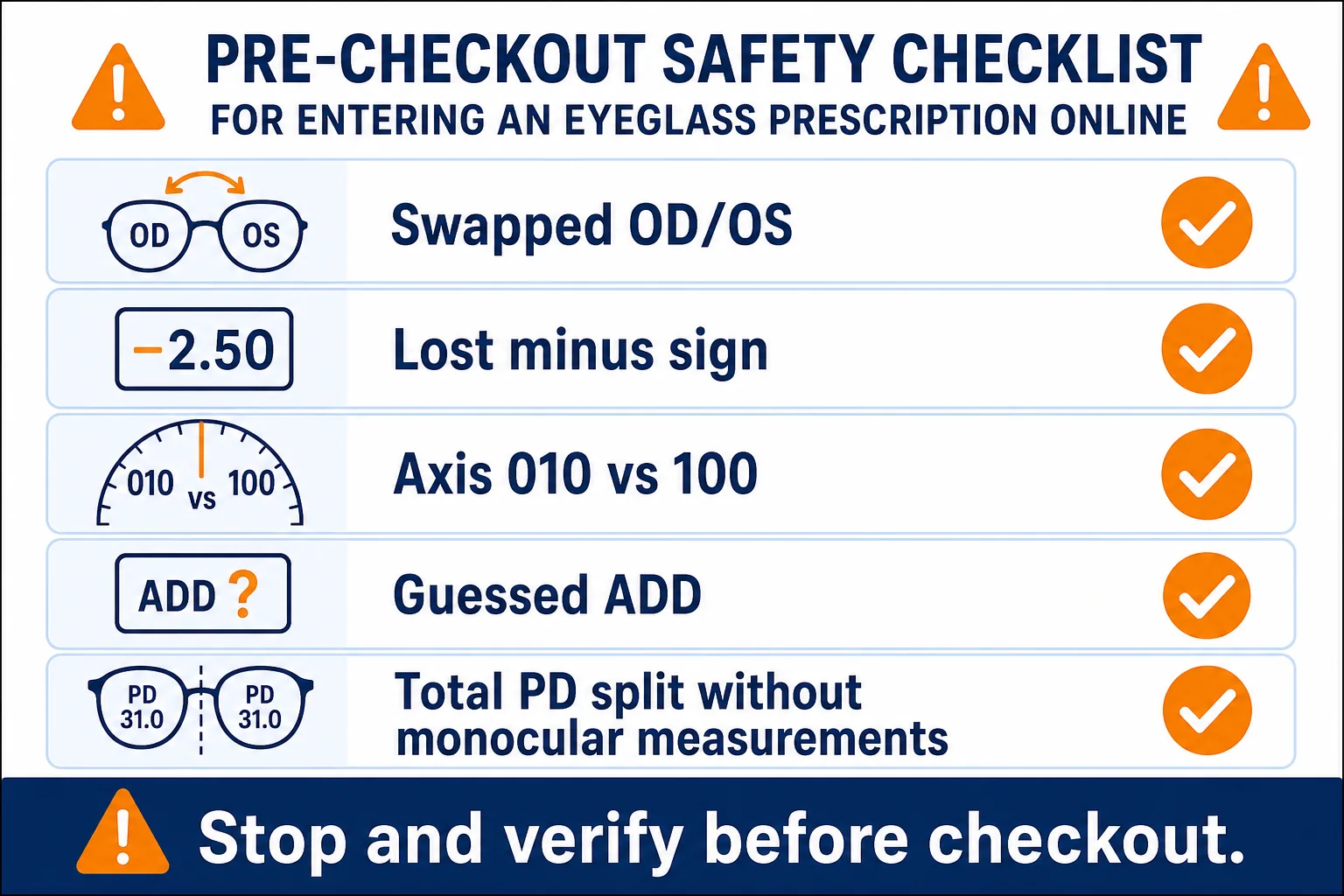
- Using a contact-lens prescription for glasses.
- Swapping OD and OS.
- Losing a plus or minus sign.
- Entering Axis as CYL, or vice versa.
- Entering Axis 010 as 100.
- Converting plus-cylinder to minus-cylinder without professional help.
- Guessing an ADD because the intended lens is progressive.
- Splitting a total PD evenly when the monocular measurements are not known.
- Omitting prism because the checkout form has no matching field.
- Submitting a prescription that is incomplete, illegible, or not accepted as valid under the applicable jurisdiction, prescriber instructions, or retailer requirements.
What if the retailer’s form does not match?
Pause the order and contact the retailer. Ask which field represents the notation and whether the prescription is supported. Do not force a close-looking value into the form.
For further reading, our independent GlassesUSA progressive ordering analysis explains measurement, lens-choice, frame-fit, and policy questions. It does not establish the current submission workflow or replace confirmation from the retailer for an exact order.
Best for – and when this guide is not enough
This transfer process is best for:
- adults with a legible eyeglass prescription accepted as valid for the order;
- orders where every written field has an exact match;
- experienced wearers whose lens use or design has been established through their prescriber or dispensing workflow;
- buyers who can obtain accurate fitting measurements; and
- people who will check the final order summary before payment.
Choose direct professional help instead of relying on this article when:
- the prescription is incomplete, difficult to read, or not accepted as valid under the applicable jurisdiction, prescriber instructions, or retailer requirements;
- the signs or notation are ambiguous;
- prism or another field is unsupported by the retailer;
- this is a first progressive after previous non-adaptation;
- the prescription or vision has changed unexpectedly; or
- you are trying to decide what power or lens type should have been prescribed.
Safety gate: an ordering problem is not always a data-entry problem
The National Eye Institute explains that refractive errors are diagnosed through an eye examination and that persistent difficulty seeing with current glasses may require an updated prescription. Review its refractive error guidance.
Do not use online ordering to troubleshoot sudden or concerning symptoms. Seek appropriate eye care for sudden vision change, eye pain, double vision, flashes, new floaters, loss of part of the visual field, or persistent blur and headaches. A retailer can remake lenses; it cannot diagnose the cause of a vision change.
Final verification checklist
- Confirm the document is an eyeglass prescription accepted as valid for the order under the applicable jurisdiction, prescriber instructions, and retailer requirements.
- Match OD/right and OS/left separately.
- Compare every SPH sign and value with the original.
- Compare CYL and Axis as a pair for each eye.
- Enter ADD only as written.
- Enter all prism amount and base information when present.
- Use the correct PD format; do not invent monocular values.
- Confirm the selected lens type matches the intended task.
- Save a screenshot of the completed prescription summary.
- Compare that screenshot with the original before paying.
Then use the progressive glasses online buying checklist to check frame eligibility, fitting inputs, configured price, and return or remake protection.
Frequently asked questions
Can I use my contact-lens prescription to buy glasses?
No. Request the eyeglass prescription. Contact lenses and glasses are fitted in different positions and use different prescription formats and measurements.
What should I enter when SPH says Plano or PL?
Use the retailer’s exact option for Plano, PL, or 0.00 only when it matches what is written. Ask support if the form does not provide a clear equivalent.
Can I leave CYL or Axis blank?
Only when the written prescription and the retailer’s instructions support that entry. CYL and Axis normally work as a pair; do not omit one to make a form submit.
Can I calculate ADD or PD myself?
Do not calculate ADD. It is prescribed. PD can be measured separately, but self-measurement adds risk, particularly for progressives. Prefer an accurate professional measurement and use self-measurement as a cross-check rather than a guessed replacement.
Is a correct prescription enough for successful progressives?
No. Prescription accuracy is necessary, but progressive performance also depends on PD, vertical fitting, frame position, corridor and design selection, task distances, manufacture, adjustment, and a remedy if the result is not usable.
Bottom line
Enter an eyeglass prescription online by copying, not interpreting. Keep the eyes separate, preserve signs, pair CYL with Axis, treat ADD and prism as distinct prescribed fields, and use real fitting measurements. When the document and the form disagree, stop. Clarification before checkout is cheaper and safer than reproducing an avoidable error in finished lenses.
Primary sources checked August 13, 2026: U.S. Federal Trade Commission Eyeglass Rule compliance guidance; FTC consumer prescription-rights guidance; National Eye Institute refractive-error guidance. Retailer forms and eligibility rules can change, so verify the instructions displayed for the specific order.
Sources and further reading

About Ho Truong
Ho Truong is a trained optician at a family optical practice established in 1991. Lens InsiderS explains lens design and fitting choices for buyers. It does not diagnose eye conditions or replace an eye examination.